
Breaking the No-Code Ceiling: How to Scale Automations for Advanced Business Workflows
Achieving scalable no-code automation is the holy grail for busy solopreneurs. It usually starts with a rush of adrenaline. You connect a lead capture form to your CRM, watch the data populate instantly while you sleep, and feel like an absolute wizard. You have reclaimed your time, bypassed the technical gatekeepers, and built a system that works tirelessly in the background.
But fast forward twelve months, and that initial magic often devolves into a fragile, anxiety-inducing web of overlapping trigger-action scenarios.
As your independent business advances, the demands on your systems multiply. You are no longer just moving a name from Point A to Point B. You are dealing with complex edge cases, multi-layered conditional logic, and mandatory approval chains. You need strict data validation to ensure the information flowing into your databases is actually usable. Suddenly, a minor anomaly—a client submitting a PDF instead of a JPEG, or typing a comma instead of a period—causes a catastrophic failure.
You start experiencing intense “admin drag.” The very systems designed to save you time now require hours of weekly maintenance. Instead of executing high-value client work or scaling your marketing, you are digging through confusing execution logs trying to diagnose why a client onboarding sequence halted in the middle of the night.
The mainstream industry advice usually dictates that you either need to pay for an expensive enterprise tier or abandon no-code entirely to hire a custom developer. This is a fundamental misunderstanding of the problem.
The ceiling you hit is rarely a software limitation; it is an architectural flaw. Most solopreneurs build automations like a tightly packed row of dominoes. They are entirely linear and highly dependent. If one step fails, the entire business process crashes.
To break through this barrier, the underlying strategy must shift from creating “point-to-point” duct-tape integrations to engineering resilient, state-aware ecosystems. The focus must transition from mere execution speed to true reliability. By rethinking how information is validated, stored, and routed, it is entirely possible to handle advanced business logic without writing traditional code. Leverage is not about connecting more apps; it is about building systems that bend without breaking.
Diagnosing the No-Code Ceiling in Your Solopreneur Business
When a solopreneur scales, the cracks in a basic automation setup rarely appear as a spectacular, system-wide crash. Instead, they manifest as a slow, agonizing accumulation of silent errors. Diagnosing this ceiling requires looking past the marketing promises of software vendors and examining the structural integrity of your data flows.
Most platforms are sold on the premise of linear simplicity: “When X happens in App A, do Y in App B.” This is perfect for simple notifications or basic list building. However, as your service delivery matures, your business logic becomes a complex decision tree. You might need to route a premium client to a high-touch onboarding sequence, while a standard tier client gets a self-serve portal—but only if their payment clears and they have signed their service agreement.
The ceiling is hit when your tool forces you to build fifty individual, disjointed workflows to handle what should be a single, intelligent process. This fragmentation is the primary enemy of scalable no-code automation. When you have dozens of overlapping scenarios firing simultaneously without a central source of truth guiding them, you create race conditions. A race condition occurs when two automations try to update the same client record at the exact same millisecond. This leads to overwritten data, skipped steps, or duplicate emails sent to a very confused client.
Furthermore, basic setups lack “state awareness.” They do not natively remember where a client is in a larger, multi-day journey. They simply react to isolated events. If a client pauses mid-onboarding to ask a question, a rigid automation will often time out or plow ahead blindly, moving the client to the next stage before they are actually ready.
Recognizing Scalable No-Code Automation Limitations Before They Cost You Clients
The cost of ignoring these architectural limitations is not just measured in lost time; it is measured in reputational damage. When your backend systems drop the ball, your clients feel the impact directly.
You must recognize the symptoms of an overloaded system before a critical failure occurs. One of the most glaring red flags is the sudden need for manual intervention in processes that are ostensibly automated. If you find yourself frequently logging into your dashboard to manually replay failed runs, or digging through execution logs to find missing data, your system needs an urgent upgrade. We frequently uncover these exact bottlenecks when conducting our workflow audits for overwhelmed solopreneurs.
Another critical warning sign is the “fear of touching anything.” When a business owner becomes paralyzed by the thought of updating a single form field because they are terrified it will break a dozen downstream workflows, the setup has become a massive liability. Your systems should enable agility, not hold your business hostage.
Scalability means predictable reliability regardless of volume or complexity. If adding a new service tier requires you to spend three days rewiring your entire backend, you are not scaling. You are just building a taller house of cards. True reliability requires a mindset shift: moving away from reactive triggers and toward robust, database-driven workflows that gracefully handle the messy reality of advanced business operations.
The Core Elements of Scalable No-Code Automation
To escape the trap of fragile integrations, solopreneurs must adopt a systems-engineering mindset. The transition to scalable no-code automation is less about purchasing a new software tier and more about redesigning how your data flows at a fundamental level.
When you build for scale, you stop optimizing for the fastest setup time and start optimizing for zero maintenance. A truly robust system operates invisibly. It catches errors before they cascade, routes tasks intelligently, and maintains a clear record of every action taken.
What distinguishes a fragile setup from a scalable one? It comes down to decoupling your processes. In a beginner’s setup, the form submission (the trigger) is directly hardwired to the email welcome sequence (the action). If the email API goes down, or the client types an invalid email address, the form submission is effectively lost or stalled in an error loop.
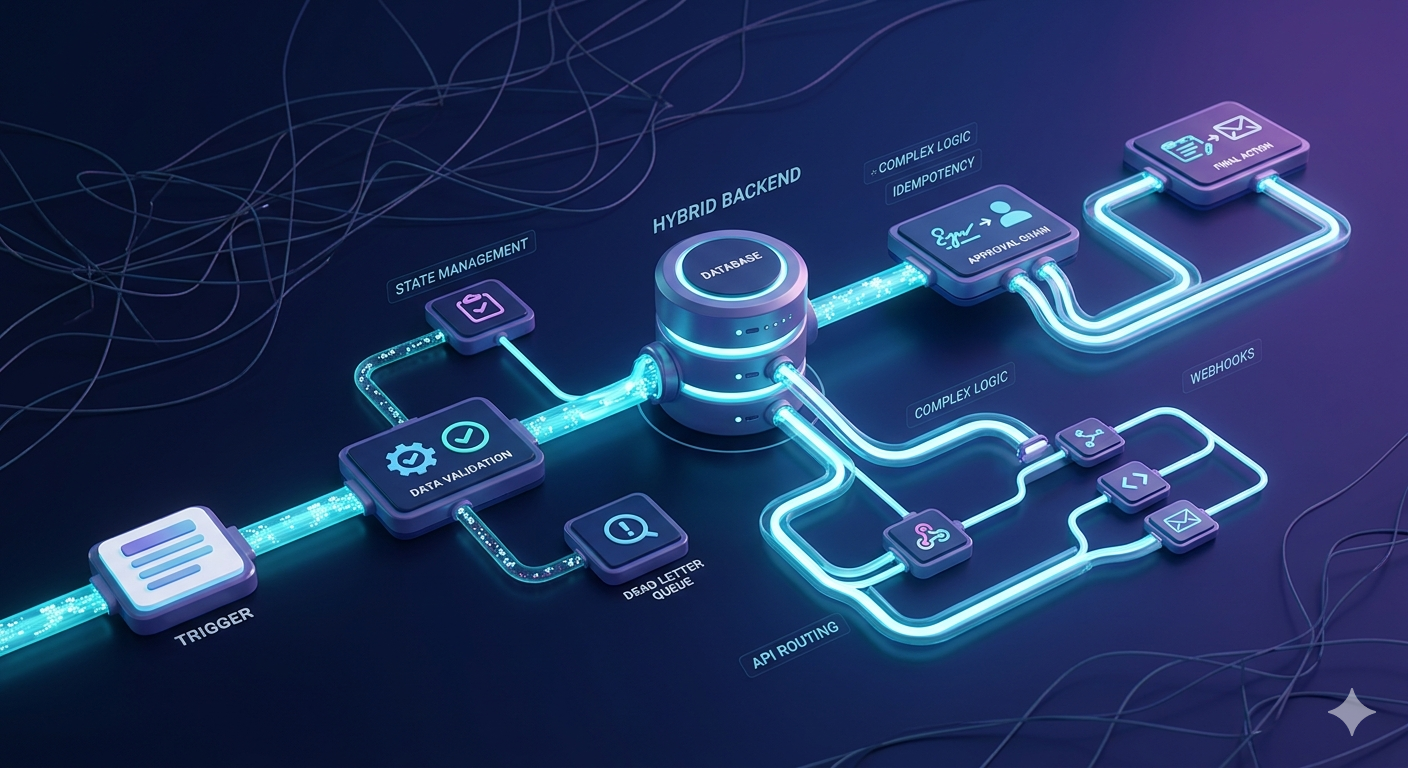
Scalable architecture introduces a buffer—a central database or “state manager”—between the trigger and the action. This fundamentally changes the resilience of your operations.
Moving from Trigger-Action to Advanced Workflow Automation
The default paradigm for most independent creators is “Trigger-Action.” A purchase happens; a Slack message is sent. A calendar event is booked; a Zoom link is generated. This linear thinking is exactly what causes the no-code ceiling.
Advanced workflow automation requires moving from linear paths to asynchronous, state-driven processes. Instead of a single workflow trying to manage an entire ten-step client onboarding sequence from start to finish, the process is broken down into independent modules that communicate through a central database, such as a well-architected Notion system or Airtable base.
Here are the core architectural elements required to transition your business to this advanced state:
- Decoupled Architecture: Your lead capture tool should not talk directly to your course hosting platform. Instead, your lead capture tool writes a record to your central database. A completely separate automation monitors that database and, when a new record appears, triggers the access provisioning. If the course platform goes down, the database record remains safe, and the provisioning automation can simply retry later without losing the lead.
- State Management: Every client, project, or task in your system must have a clearly defined “status” (e.g., Pending Payment, Ready for Onboarding, Active). Workflows should trigger based on status changes in your database, not just isolated events. This makes your systems “state-aware” and capable of pausing, waiting, or resuming without breaking.
- Error Catching and Routing: A scalable setup anticipates failure. Advanced architecture includes specific routing for what happens when a step fails. Instead of the workflow silently dying, an error-handling module flags the database record as “Error” and sends a consolidated daily digest of issues requiring your attention. This eliminates the need to constantly monitor execution logs.
- Idempotency: This is a technical principle meaning a workflow can run multiple times without causing unintended side effects. If a glitch causes your onboarding sequence to trigger twice, an idempotent system checks the central database first: “Has this client already received their welcome email?” If yes, it safely terminates. This prevents the dreaded scenario of spamming a new client with duplicate communications.
By implementing these architectural principles, you transform your automated operations from a chaotic web of reactive tasks into a calm, predictable, and highly scalable engine. You stop treating automations as isolated parlor tricks and start treating them as a cohesive digital workforce.
Why You Need a Hybrid No-Code Backend
The concept of a “hybrid no-code backend” sounds intimidating to a solopreneur who just wants to sell their consulting services or digital assets. However, it is the exact framework required to eliminate the anxiety of fragile systems. Most independent creators build “monolithic” setups. They expect their form builder or landing page software to not only collect the user data but also act as a pseudo-database, send the welcome email, and apply conditional tagging.
When you force a single application to handle the frontend interface (what the user sees), the backend logic (the business rules), and the database (the long-term storage), you create a massive structural bottleneck. If that one application experiences a brief API outage, or if a user inputs an unexpected character, your entire business process halts, and data is permanently lost in the void.
To achieve true scalable no-code automation, you must structurally separate your presentation layer from your data layer. This separation of concerns is the essence of a hybrid system. You leverage user-friendly, visually agile no-code tools for the frontend, but you anchor them to a robust, relational database for all the heavy lifting.
Pairing Agile Frontends with Robust Databases
A robust database—such as an advanced Airtable architecture or even a backend-as-a-service platform like Supabase or Xano—is designed to do one thing exceptionally well: store, relate, and protect data. It does not care about UI aesthetics. It cares exclusively about data integrity and availability.
In a hybrid setup, when a client submits a complex onboarding questionnaire, the frontend tool (like Typeform, Softr, or a Notion portal) has a single responsibility: immediately hand off that payload to your backend database via a webhook. That is its only job. Once the raw data lands safely in the central database, your dedicated automation engine (like Make or n8n) takes over. The engine watches the database for new, unprocessed records and sequentially executes the necessary business logic.
This hybrid approach provides several massive operational advantages for the time-poor solopreneur:
- Absolute Data Permanence: If your automation engine experiences an error or an API limit is reached, the original client data is still safely sitting in your database. You have not lost a high-ticket lead. You can simply adjust the logic error and re-run the process from the database record without asking the client to resubmit their information.
- True Platform Independence: If you decide to migrate your website builder from Webflow to Framer next year, your backend operations remain completely untouched. You simply point the new frontend form to the existing database webhook, saving weeks of migration headaches.
- Advanced Relational Querying: Native tool integrations often struggle to look up existing client records before creating new ones, leading to messy, duplicate CRM contacts. A dedicated backend database allows your automations to perform complex “find or create” logic, ensuring your client history remains impeccably clean and consolidated.
- Bypassing Polling Delays: Relying on standard 15-minute polling triggers to move data between apps creates frustrating delays for clients waiting for access. By pushing data directly to a backend database via webhooks, you enable near-instantaneous execution, drastically improving the client experience.
Embracing this architecture shifts your operations from a precarious house of cards into a resilient, enterprise-grade machine. You are no longer reliant on the limited, built-in features of a single consumer app. Instead, you are orchestrating a suite of specialized, high-performance tools, each performing its specific role flawlessly. This is how you reclaim those 10+ hours a week—by building a reliable foundation that entirely eliminates the need for constant, manual babysitting.
Taming Complex Conditional Logic and Edge Cases
As your business matures, you quickly realize that clients rarely follow the exact linear path you designed for them. A prospect might book a discovery call, subsequently fail their payment authorization, and simultaneously submit a support ticket asking about a different service tier.
When you try to map these messy reality loops into a standard automation tool using nested “If/Then” filters, you end up with a terrifying, unmaintainable spiderweb. This “spaghetti logic” is incredibly difficult to navigate. If you need to change a single pricing rule, you have to dig through twenty different branches to update the logic, inevitably breaking something else in the process.
To achieve scalable no-code automation, you must stop hardcoding your business rules directly into the workflow canvas. Instead, you need to deliberately externalize your logic.
Advanced operators utilize a concept called a “Routing Table.” Rather than building a giant tree of filters inside their automation engine, they create a dedicated table in their backend database that strictly stores their business rules. When a complex event occurs, the automation does not attempt to guess what to do; it queries the database routing table. It essentially asks, “What is the standard operating procedure for a Tier 2 client who failed their initial payment?” The database returns the exact next steps, and the automation executes them blindly. This means you can update your entire business logic within a clean spreadsheet interface without ever risking the structural integrity of the automation modules.
Safely Routing Multi-Step Approval Chains
One of the most notoriously difficult edge cases to handle in a growing business is the multi-step approval chain. Whether it is approving a finalized client deliverable, authorizing a partial refund, or reviewing a complex data entry, these processes mandate human intervention before the system can proceed.
Basic automation tools are built to run fast and finish instantly. When you insert a native “wait for approval” module into a linear workflow, you are forcing the entire system to hold its breath. If the human reviewer is out sick or takes a four-day weekend, the workflow will often hit its maximum server timeout limit. The workflow silently fails, and the critical task is permanently abandoned in digital limbo.
The professional solution to this bottleneck is completely abandoning the “wait” module. Instead, you implement a highly resilient “Callback Architecture.”
Here is exactly how this robust structure operates in practice:
- The Initial Run: The first workflow generates the required deliverable, updates your central database status to “Pending Approval,” sends a notification email or Slack message to the designated reviewer, and then completely terminates. It does not wait for a response.
- The Actionable Payload: The notification message sent to the reviewer contains unique, clickable buttons (typically custom webhooks) for “Approve” or “Reject.” Embedded invisibly in those generated links is the unique database ID for that specific client task.
- The Callback Workflow: When the human finally clicks “Approve,” that simple click triggers an entirely separate, secondary workflow. This new automation receives the unique ID, locates the exact record in your database, changes the status to “Approved,” and initiates the final delivery sequence.
This decoupled structure is virtually impervious to timeouts. The human reviewer could take three minutes or three months to click the button; the automation system will not care. It gracefully handles the indefinite pause and resumes precisely where it left off, ensuring that no client deliverable is ever lost to a timed-out server connection again.
Securing Your Systems with Automated Data Validation
The phrase “garbage in, garbage out” is practically a cliché, but in the realm of automation, it represents a fatal business vulnerability. When a solopreneur first builds a lead generation system or client intake portal, they usually rely entirely on the frontend form builder to handle data validation. They assume that if a field is marked “email,” the client will perfectly format their address without issue.
The reality of digital business is far messier. Clients routinely type commas instead of periods, paste invisible formatting or line breaks into plain text fields, and submit portfolio URLs without the mandatory “https://” prefix.
If your automation engine attempts to push this malformed, raw data directly into a sensitive third-party application—such as a Stripe payment link generator or an automated contract signing API—the receiving software will reject the request. When an API rejects a malformed variable, standard integrations rarely send a helpful, human-readable alert; they simply crash. The client is left waiting for a deliverable that will never arrive, and you remain completely unaware of the failure until they send an angry follow-up email days later.
To maintain scalable no-code automation, you must architecturally assume that all incoming data is fundamentally untrusted and flawed until mathematically verified. The professional solution is to build a “Data Sanitization Layer.” This acts as a digital checkpoint, or a Demilitarized Zone (DMZ), positioned strictly between your public-facing forms and your pristine backend database.
Stopping Errors Before They Enter Your Database
Implementing a sanitization checkpoint completely transforms how your backend handles anomalies. When a webhook delivers a new payload from a client, the very first step in your automation sequence must never be “Create CRM Contact.” Instead, the initial sequence must be a gauntlet of formatting and validation modules designed to clean and verify the information.
Here is how you structure an automated firewall to protect your database integrity:
- Forced Standardization: Utilize native text formatting tools within your automation engine to strip invisible leading and trailing spaces from all incoming text fields. Force all incoming email addresses to convert into lowercase characters immediately. This incredibly simple step prevents your database from creating two entirely separate client profiles for “Jane@example.com” and “jane@example.com”, which eliminates duplicate records and billing confusion.
- Structural Verification: If your onboarding process requires a valid website URL to trigger an automated audit report, do not blindly pass the user’s input to the reporting tool. Use a Regular Expression (Regex) or a dedicated URL formatting module to guarantee the protocol is present and the domain is valid before attempting to run the heavy, expensive API call.
- The Dead Letter Queue (DLQ): This is a highly effective concept borrowed from enterprise software engineering that solopreneurs must adopt. What happens when the submitted data is so heavily malformed that it cannot be automatically reformatted? Instead of letting the workflow crash and losing the lead entirely, the automation deliberately routes this broken payload into a dedicated “Quarantine” or “Needs Review” table in your database.
By intentionally routing bad data to a quarantine zone, you trigger a simple Slack or email alert to yourself: “New lead captured, but the email format is invalid. Manual fix required.”
This protective layer ensures the structural integrity of your core database remains uncompromised. Your systems continue running flawlessly for the 99% of clients who fill out their forms correctly. You drastically reduce the notorious “admin drag” because you are no longer spending hours diagnosing why an entire onboarding pipeline collapsed. You are simply taking three seconds to fix a typo in an isolated, quarantined row. This meticulous control over data is the absolute hallmark of a mature, scalable system that buys back your time and protects your client experience.
When to Upgrade to Enterprise No-Code Tools
Implementing advanced architectural shifts—such as callback frameworks and dead letter queues—requires an engine capable of supporting robust logic. At a certain stage, consumer-grade automation tools simply cannot keep up with the technical demands of a high-functioning solo business.
Many creators mistakenly assume that scaling means paying a higher monthly subscription fee to their current provider just to unlock more “tasks” or “runs.” But true scale is rarely about volume; it is almost entirely about complexity and infrastructure.
You quickly realize you have outgrown your current platform when you begin to encounter artificial branching limits. If your automation software restricts you to only two or three conditional paths, or if it lacks native error-handling modules, it is effectively handicapping your operational growth. Achieving scalable no-code automation demands infrastructure that allows for infinite routing, deep data manipulation, and seamless API communication without locking logic steps behind paywalls.
Another critical inflection point is webhook throughput and concurrency. Basic platforms process data sequentially, placing tasks in a slow, rigid queue. If fifty clients purchase a digital asset simultaneously during a product launch, a linear tool might choke on those requests, leading to massive delays in fulfillment. Professional-grade platforms handle asynchronous execution. They process those fifty requests concurrently, ensuring every single client receives their onboarding materials instantly, regardless of the traffic spike.
Tool Recommendations for the Time-Poor Solopreneur
Transitioning to professional-grade infrastructure does not mean you have to learn how to write Python or manage complex cloud servers. The modern software ecosystem offers powerful alternatives that blend enterprise-level reliability with visual, user-friendly interfaces tailored perfectly for the independent operator.
Here is a strategic tech stack upgrade path for the advanced solopreneur looking to solidify their backend:
- Make (formerly Integromat): This is arguably the most powerful visual automation builder on the market for solopreneurs. Unlike platforms that force a linear, top-to-bottom build, Make operates on a limitless 3D canvas. It natively supports advanced error routing, complex JSON parsing, and infinite branching without extra fees. It is the ideal engine for orchestrating multi-step approval chains and complex client logic.
- n8n: For solopreneurs experiencing exceptionally high execution costs, n8n offers a revolutionary model. It provides node-based automation similar to Make, but with a highly technical edge. Because it can be self-hosted or run on a specialized cloud tier, it effectively removes the anxiety of paying per-task. It is the ultimate tool for high-volume, data-heavy operations where throughput is critical.
- Xano or Supabase: As discussed earlier, a hybrid backend is non-negotiable for scale. Transitioning away from spreadsheet-based databases (like basic Google Sheets setups) to a dedicated Backend-as-a-Service (BaaS) like Xano or Supabase provides absolute data security. These platforms offer native API endpoints and rigorous relational architecture without the fragility of consumer apps.
Upgrading to these robust platforms absolutely requires an initial learning curve and a weekend of focused rebuilding. However, the return on investment is permanent. By migrating your core business logic to these industrial-strength engines, you permanently eliminate the “admin drag” caused by fragile systems. You transition from being a constant repair technician to a true systems architect.
Conclusion: Reclaim Your Time with Sustainable Architecture
The journey from an overwhelmed independent operator to a high-leverage solopreneur is defined by how you handle complexity. In the early days of a business, speed is your greatest asset. You duct-tape tools together to validate your offers and acquire your first clients. But as you mature, that same speed becomes a liability. You cannot outwork a fragile system. When your lead volume doubles, or your service delivery requires meticulous, multi-step approvals, a linear “if-this-then-that” approach will inevitably fracture.
True scalable no-code automation is not about discovering a secret, magical software platform that flawlessly handles every edge case out of the box. It is about adopting the mindset of a systems architect. It is the deliberate shift from building reactive, trigger-based chains to engineering resilient, state-aware environments. By separating your frontend interfaces from your backend databases, externalizing your business logic into routing tables, and implementing rigorous data sanitization layers, you fundamentally alter the DNA of your operations.
This architectural maturity provides something far more valuable than just execution speed: it provides absolute peace of mind. When you know that malformed data will be safely quarantined in a Dead Letter Queue rather than crashing your payment gateway, you stop checking execution logs obsessively. When you implement asynchronous callback loops for human approvals, you eliminate the anxiety of server timeouts.
Your technology stack should act as a silent, invisible workforce that operates with enterprise-level predictability. It should absorb anomalies, handle infinite routing, and protect your most valuable asset: your time. By moving past the beginner’s paradigm of simple connections and embracing hybrid no-code architecture, you stop working for your automations. Instead, your automations finally start working for you, empowering you to focus entirely on high-impact strategy and revenue generation without the constant drag of technical maintenance.
Your Next Step: A 15-Minute Workflow Audit
Reading about advanced architecture is only the first step; the transformation happens in the application. However, attempting to tear down and rebuild your entire technological infrastructure in a single weekend is a recipe for operational disaster. The most successful solopreneurs scale their systems iteratively.
Your immediate next step is to conduct a highly focused, 15-minute diagnostic session on your single most frustrating process. Identify the one automation in your business that currently demands the most manual intervention. Which sequence requires you to constantly resend emails, manually fix formatting, or apologize to clients for dropped deliverables?
Once you have identified this bottleneck, do not try to fix the existing logic. Instead, apply just one principle of scalable no-code automation we discussed today. Insert a central database buffer between the initial trigger and the final action. Decouple the process so it becomes state-aware, or add a simple data sanitization checkpoint to ensure only clean information passes through to your CRM.
If you are unsure where to begin diagnosing these hidden structural flaws, we are here to help you navigate the complexity. I highly recommend booking one of our comprehensive WorkFlowMint Workflow Audits. We will sit down together, map out your current data flow, identify the exact race conditions causing your headaches, and provide a custom architectural blueprint to make your backend virtually unbreakable. Stop letting fragile systems dictate your schedule. Take control of your infrastructure today, and buy back the time you need to truly scale your business.